
The hidden cyber security risk behind today’s headlines

When major news breaks — a global sporting event, a political upheaval, a natural disaster — cyber criminals use that attention as bait. They send timely, urgent, believable phishing emails tied to the headlines, because people are far more likely to click when a message feels relevant. The threat isn’t the news itself; it’s the wave of current‑affairs phishing scams that follow it. The best defence is a brief pause and a few quick checks before you click.
When big news breaks, cyber criminals pay attention. Whether it’s a major sporting event, a global conflict, a high‑profile data breach or a national event, attackers know one thing very well: people are more likely to click when something feels timely, urgent and relevant.
That’s exactly what makes current affairs such powerful bait. Most cyber attacks don’t begin with someone “hacking through” a firewall the way films suggest. Very often they start with something much simpler — an email, a link, a fake login page, a convincing message, a request that feels just believable enough to act on.
That is why world events matter so much in cyber security.
How do cyber criminals use the news to launch attacks?
Cyber criminals are opportunists. They look at what people are talking about, searching for and reacting to, then use that attention to create believable scams.

Right now there are plenty of examples:
- The FIFA World Cup is underway. Millions are following the action, and attackers know it. Fake ticket websites, streaming links, travel offers and FIFA‑themed emails all give them a way to catch people off guard.
- UK political headlines surrounding the resignation of Prime Minister Sir Keir Starmer create another opening. Fake news alerts, surveys, petitions and donation requests can all be used to encourage clicks.
- The current heatwave offers its own angle — attackers can exploit weather warnings, travel disruption, energy support schemes and insurance claims to build convincing phishing campaigns.
The topic changes. The technique doesn’t. Cyber criminals simply follow the headlines and turn public attention into phishing opportunities.
Why is the human element still the biggest target?
Security technology has come a long way. Organisations are investing in better email protection, endpoint security, identity controls, monitoring and managed detection. That’s brilliant progress.
But attackers know that people are still one of the easiest ways in. In fact, nearly 60% of security breaches still involve a human element(opens in new window).
That doesn’t mean people are the problem. It means people are the target. And when a message is linked to something already in the news, it becomes much easier to believe.
Why do these phishing scams actually work?
The best phishing emails don’t always look suspicious anymore. They might not have terrible spelling. They might not come from an obviously strange email address. They might not feel like a scam at all.
Instead, they use things we naturally respond to:
- Urgency
- Curiosity
- Fear
- Excitement
- Confusion
That emotional reaction is exactly what attackers want. They want people to move quickly, before they pause and think.
What are the five things to check before you click?
The good news is that a short pause can make a big difference. Before clicking a link, opening an attachment or actioning a request, check these five things.
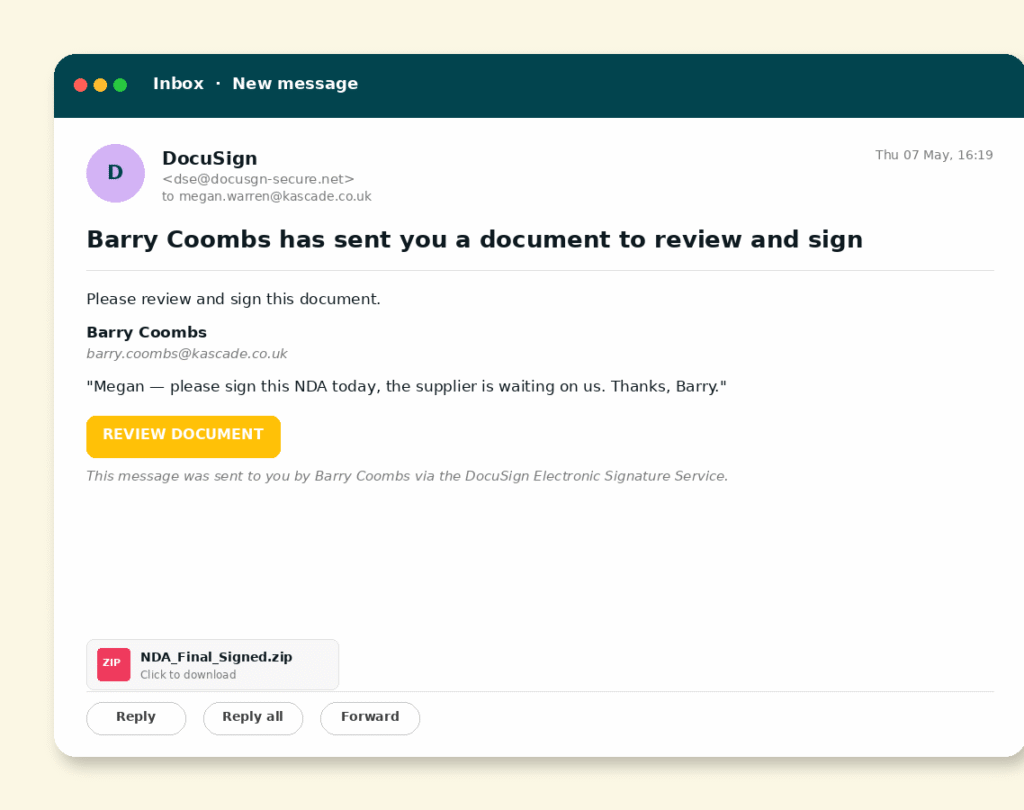
1. Were you expecting it?
Unexpected emails should always make you pause, especially if they include links, attachments, payment requests, password resets or document shares. If you weren’t expecting it, don’t rush.
2. Where does the link really go?
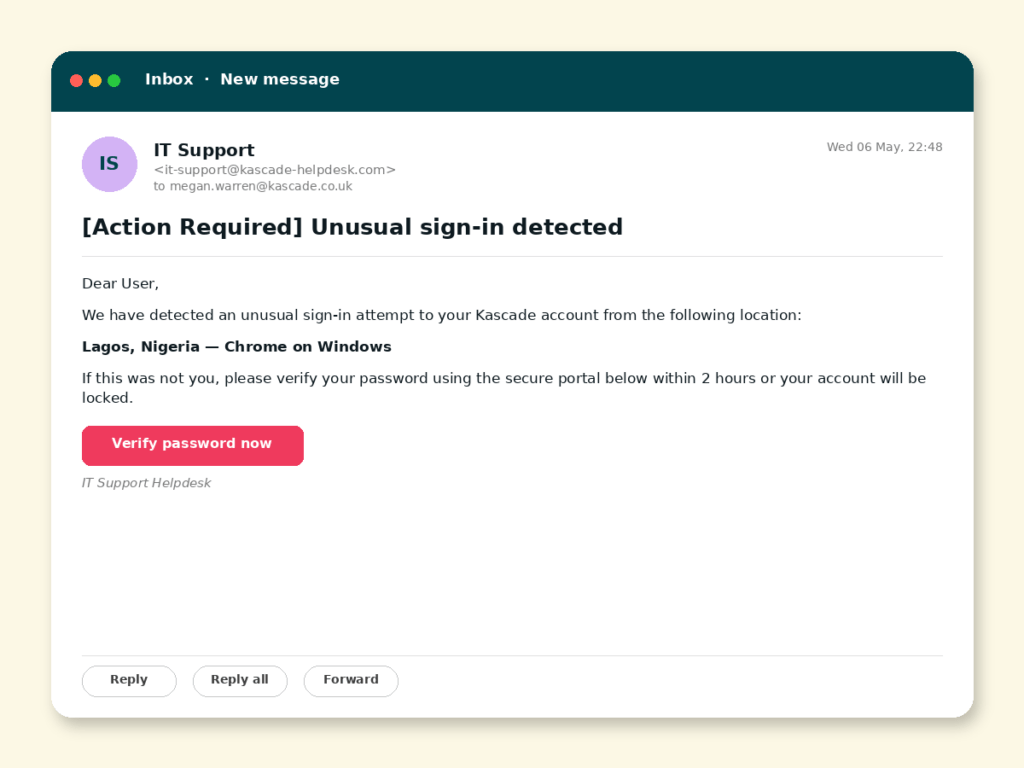
Before clicking, hover over the link and check the destination. If it looks unusual, shortened, misspelt or unrelated to the organisation, don’t click it. Go directly to the official website instead.
3. Is it trying to create urgency?
Attackers love pressure. Phrases like “act now”, “urgent action required”, “your account will be closed”, “limited time only” or “payment failed” are designed to make you respond quickly. Urgency doesn’t always mean fraud, but it should always make you slow down.
4. Does the sender look right?
Don’t just look at the display name. Check the full email address for subtle misspellings, unusual domains or extra characters. An email might say it’s from Microsoft, FIFA, HMRC, your bank or a supplier — but the actual address may tell a different story.
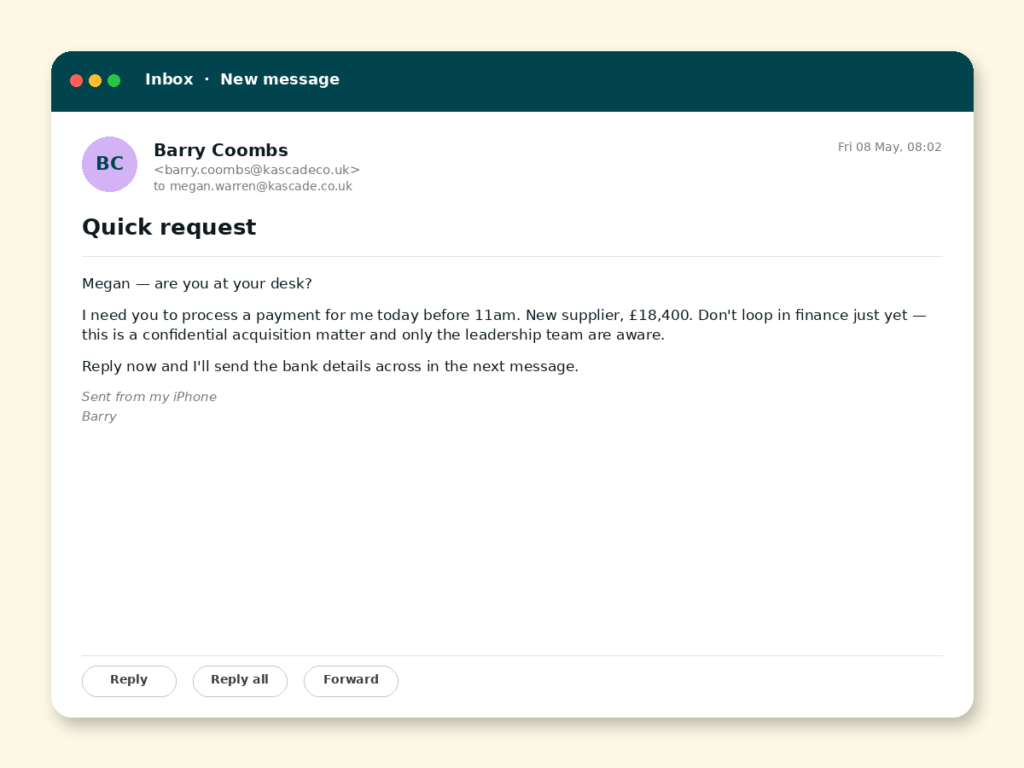
5. Does the request make sense?
This is one of the most powerful checks. Ask yourself:
- Would your CEO really ask for gift cards by email?
- Would a supplier suddenly change their bank details without a phone call?
- Would a government department ask you to log in through that link?
- Would a World Cup ticket offer really be sent from that domain?
How can you get better at spotting phishing threats?
Cyber criminals are constantly adapting. Today’s phishing emails look very different to those of a few years ago, and they’re increasingly built around current events, trusted brands and topics people are already talking about.
That’s why security awareness training remains so important. The goal isn’t to turn every employee into a cyber security expert — it’s to help people recognise warning signs, question unusual requests and feel confident enough to stop and think before they click.
One of the most effective ways to build that instinct is to practise on realistic, current‑affairs‑style scams in a safe setting. Our on‑demand webinar, Can you outsmart a phishing attack? throws you into real‑world scenarios and tests your ability to spot the red flags under pressure.
Combined with the right security technology, a well‑informed workforce can become one of an organisation’s strongest defences against phishing and social engineering attacks.
Want to see how your users respond to real‑world phishing attacks?
KnowBe4 helps organisations reduce human risk through engaging security awareness training and realistic phishing simulations based on the threats people face every day.
From current‑affairs‑themed phishing campaigns to supplier fraud, credential theft and AI‑generated scams, KnowBe4 helps users recognise threats before they become incidents.

Frequently asked questions
It’s a phishing scam that uses a topical news event — a sporting tournament, political news, a weather emergency — as the hook. Because the subject is already on people’s minds, the fake email, link or website feels more believable and is more likely to be clicked.
Timely, relevant topics trigger emotional responses like urgency, curiosity and excitement, which make people act before they think. Attackers simply follow whatever is getting attention and build their lures around it.
Nearly 60% of security breaches still involve a human element, according to the Verizon Data Breach Investigations Report — which is why people, not just technology, are a key line of defence.
Pause and run five checks: were you expecting it; where does the link really go (hover to see); is it manufacturing urgency; does the full sender address look right; and does the request actually make sense? If anything feels off, verify through a separate, trusted channel.
Yes. Training helps employees recognise warning signs and question unusual requests, so a well‑informed workforce becomes one of an organisation’s strongest defences when paired with email protection and other security technology.