
Microsoft Scout explained: How Microsoft’s first autonomous Copilot works
Microsoft has been increasingly clear about where Copilot is heading, and the word it keeps coming back to is agentic. The vision they’ve been setting out is one where AI stops being a tool you reach for and becomes a workforce that works for you, agents that take on whole tasks, run in the background, and get on with the job without waiting to be asked. In Microsoft’s framing, every employee gradually becomes a kind of manager of agents, and before long you’ll even have agents helping to manage other agents. It’s a shift from doing the work yourself to directing the work that gets done.
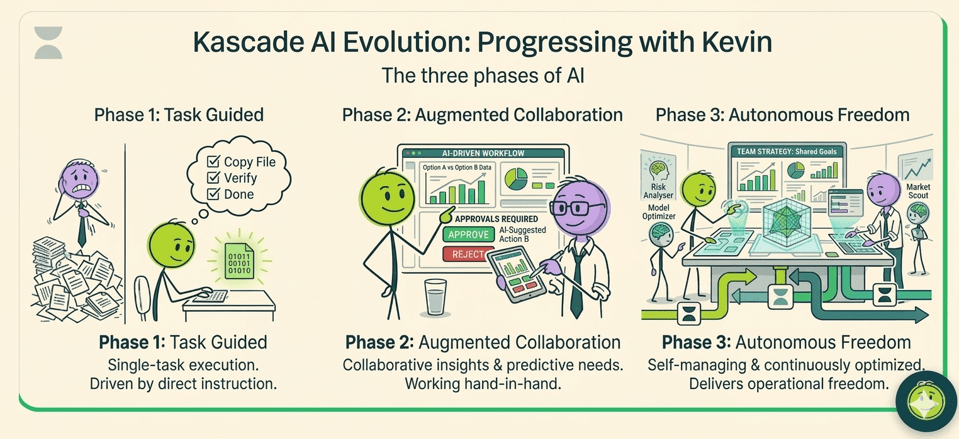
It’s a neat way to picture the journey, and it tends to play out in three phases:
- AI that follows direct instructions one task at a time
- AI that collaborates with you and anticipates what you need
- AI that manages itself, runs autonomously and quietly optimises as it goes.
- Microsoft Scout is the first real product to step into that third phase — so it’s worth understanding what it actually is.
What is Microsoft Scout?
Microsoft Scout is an always-on personal agent for Microsoft 365, announced at Microsoft Build on 2 June 2026. It’s the first example of what Microsoft is calling an “Autopilot”, a new category of agent that works autonomously in the background, holds its own identity, and takes action on your behalf without being prompted each time.
Here’s the shift in one line: Copilot waits for you to ask, whereas an Autopilot keeps working when your attention is elsewhere. Scout sits across Teams, Outlook, OneDrive and SharePoint, watches the flow of your day across chats, email, calendar and contacts, and acts within the permissions your organisation has set.
It’s early days, though. Scout is an experimental release available only in private preview, to a select group of customers and to organisations in Microsoft’s Frontier programme, and it currently needs a GitHub Copilot licence too. So this is a piece to understand and plan for, not one to roll out next week. Even so, every organisation should be aware of it, because it points clearly at where Microsoft 365 is heading.
How is an “Autopilot” different from Copilot?
The distinction Microsoft is drawing is between assistance and autonomy. Copilot is reactive: you open a chat, ask it to draft, summarise or analyse, and it responds. It’s a tool you pick up when you need it.
An Autopilot is proactive and persistent. It stays active in the background, builds an understanding of how your work gets done, and initiates actions itself. Microsoft’s examples for Scout include coordinating meetings across time zones, flagging the meetings it judges important and preparing materials for them, spotting upcoming deliverables and blocking time on your calendar to protect them, and surfacing risks, such as a stalled decision, before they become a blocker.
Underneath, Scout is built on OpenClaw, an open-source framework for autonomous AI agents that connects a language model to real execution surfaces like files, the browser and connected services. Microsoft grounds it with a layer it calls Work IQ, which learns your priorities over time and carries context forward, and it subscribes to real-time signals from Microsoft Graph so it can react to changes as they happen.
How is an always-on agent governed?
This is the part worth reading closely, because an agent that acts on its own raises an obvious question: under whose authority, and with what guardrails?
Microsoft’s answer rests on a few claims. Every Scout agent runs under its own governed Entra identity rather than a shared service account, so its actions are attributable to a known actor your directory already understands. The credentials behind that identity are scoped to the task and kept out of logs and diagnostics. Access is limited to the resources you approve, sensitive actions can require a human to sign off before they proceed, and Microsoft Purview data-protection policies, sensitivity labels and data loss prevention, are applied in the moment, before anything is sent or written. That per-agent identity is the most important idea here: attribution is what makes autonomous action auditable, and it’s the right foundation.
It’s worth holding the counterweight, though. Independent coverage has been blunt about the breadth of access Scout asks for; email, calendar, files, chats, the desktop, the browser and connected services, and about OpenClaw’s own track record, which has drawn criticism on security. Agents in general have proven manipulable, too: researchers have shown that crafted web pages and content can trick an agent into actions or data disclosure its operator never intended, sometimes with no direct user interaction. None of this is unique to Scout, and Microsoft’s controls are designed to mitigate it, but the attack surface is real and the governance design is still largely unproven at scale, which is exactly why a preview exists.
What this means for technical leaders
For many organisations, particularly those operating in regulated or compliance-heavy sectors, Scout may feel too early for production use.
That’s completely reasonable. But there is an important distinction between being too early to deploy and being too early to learn. The real risk isn’t adopting Scout too soon. The real risk is ignoring where the technology is heading and being unprepared when autonomous agents become mainstream.
Technical leaders should be focusing on two separate decisions:
- When is a technology ready for a controlled internal trial?
- When is it ready for wider organisational adoption?
Those decisions require different levels of confidence, governance and risk tolerance.
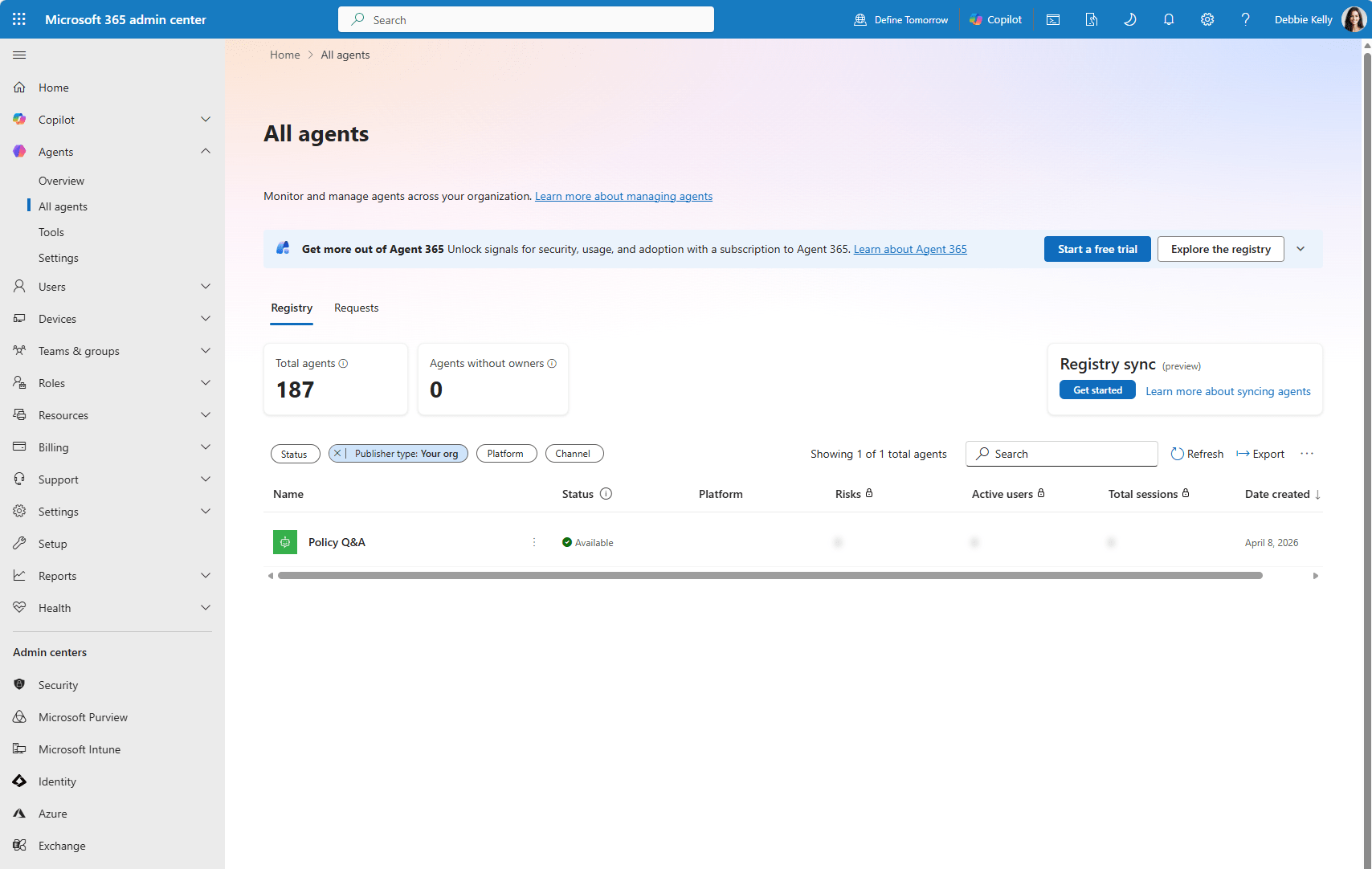
Autopilots also change the management and control plane in a more fundamental way. For years that plane has been about people and devices — who has an identity, what they can access, what hardware they use, and agents now become a first-class citizen alongside them. An Autopilot is an actor with an identity, permissions and a lifecycle, and it needs to be managed as one. That fits naturally with the joiner, mover and leaver process you already run: an agent tied to a person who changes role or leaves has to be reviewed, re-scoped or removed in the same breath as their account. We’ve written more on the practical side of this in How to regain control of AI agents in Microsoft 365, which is a useful companion to this piece.
Three questions has surfaced as a result:
Approval design. Deciding which actions are autonomous and which need sign-off is a governance choice, not a technical default. Getting that boundary right — enough autonomy to be useful, enough friction to be safe — is the real design work.
Access scoping. The agent only reaches what you approve — so someone has to decide what “approved” means per agent, per dataset, per action, and keep it current. It’s least-privilege thinking for non-human actors.
Data protection as the backstop. Purview labels and DLP are the in-the-moment enforcement layer. If your labelling is patchy today, an always-on agent is a strong reason to fix it first — an agent enforces the policy you have, not the one you meant to have.
For firms in compliance-conscious sectors such as accountancy, legal and architecture, this is a Cyber Essentials, ISO 27001 and data-governance conversation as much as a productivity one. An estate that’s ready to adopt agents safely is one where identity, access and data classification are already in good order.

The real takeaway: you need an AI adoption strategy
Scout makes the case for something bigger than Scout itself: every organisation needs an AI adoption strategy, and a way of evaluating and rolling out new capability in a governed, safe and repeatable manner.
If your stance today is broadly “no to AI,” and you have no policy for assessing tools like this and bringing the right ones in under proper controls, an announcement like this should be a prompt to act. It doesn’t mean saying yes to everything. It means having the framework to say yes safely, or no deliberately, rather than being forced into a reactive decision later. The organisations that benefit from the agentic shift will be the ones whose identity, data governance and adoption process were ready for it.
This is also where an internal IT team and a partner work well together. Building the evaluation process, getting identity and Purview into shape, and deciding where agents fit is exactly the kind of work where a second set of experienced hands earns its keep.
What you can do now
You can’t broadly deploy Scout today. Access is currently limited to private preview participants and organisations within Microsoft’s Frontier programme.
What you can do is prepare.
Now is the time to:
- Review your Entra identity and access controls
- Strengthen Conditional Access policies
- Improve Purview labelling and DLP coverage
- Extend joiner, mover and leaver processes to include agents
- Define where autonomous actions would and wouldn’t be acceptable
- Monitor how Scout and similar technologies mature during preview
The announcement of Scout shouldn’t trigger a rush to deploy.
It should trigger a conversation about strategy.
Because while Scout may still be early, the direction Microsoft is heading is becoming increasingly clear. The organisations that start preparing now will be in a far stronger position when autonomous agents become part of everyday business operations.
Ready to get ahead of the agentic shift?
You can’t adopt Scout today — but you can make sure your organisation is ready for what comes next. Kascade helps you get your identity, data governance and adoption process in order, and build a repeatable way to evaluate new AI capability safely. When always-on agents arrive, you’ll be making a deliberate choice rather than scrambling to react.

Frequently asked questions
Is Microsoft Scout generally available? As of June 2026 it’s an experimental release in private preview, open to a select group of customers and to organisations in Microsoft’s Frontier programme. Access currently requires Frontier enrolment, Intune policy configuration, an opt-in attestation and a GitHub Copilot licence.
What can Scout actually do? Microsoft’s stated examples are coordinating and scheduling meetings across time zones, flagging important meetings and preparing materials for them, identifying deliverables and blocking calendar time to protect them, and spotting risks such as stalled decisions. It operates across Teams, Outlook, OneDrive and SharePoint, and can extend to the browser, local resources and connected services through the desktop app.
Is it secure? Microsoft has built a governance model around per-agent Entra identities, scoped credentials, approval gates for sensitive actions, and in-the-moment Purview enforcement. The design is credible, but always-on agents are a new and broad attack surface, the underlying OpenClaw framework has drawn security criticism, and the controls aren’t yet proven at scale. Evaluate it carefully rather than trusting it by default.
Does Scout replace Copilot? No — it’s a different category. Copilot is a reactive assistant you ask; an Autopilot like Scout is a persistent agent that acts on its own within set permissions. They’re complementary rather than a like-for-like upgrade.
What is OpenClaw? OpenClaw is an open-source framework for building autonomous AI agents that connect a language model to real-world actions such as file access, browser automation and connected services. Microsoft adds enterprise identity, credential and access controls on top of it for Scout, and is contributing policy-conformance tooling back to the project.