
I’ll be honest: I’ve spent the last couple of years living in tools like Microsoft Copilot, testing prompts, learning how it can work alongside me, save me time, give me better output but there was always a question of trying to work out where all this is actually heading beyond the hype. So I didn’t expect to be surprised. But after a month of properly using Cowork? This one feels different.
And not in a “slightly faster answers” way. Cowork changes the whole relationship between you and the AI. It stops feeling like asking a tool for help, answering questions and starts feeling like working alongside something that’s actively getting the job done with you.
A month in, I’ve started relying on it. It’s now part of my daily workflow, and that’s given me a real feel for where it shines, where it asks something different of you, and why I’m convinced tools like this are the next big shift in how we work with AI.
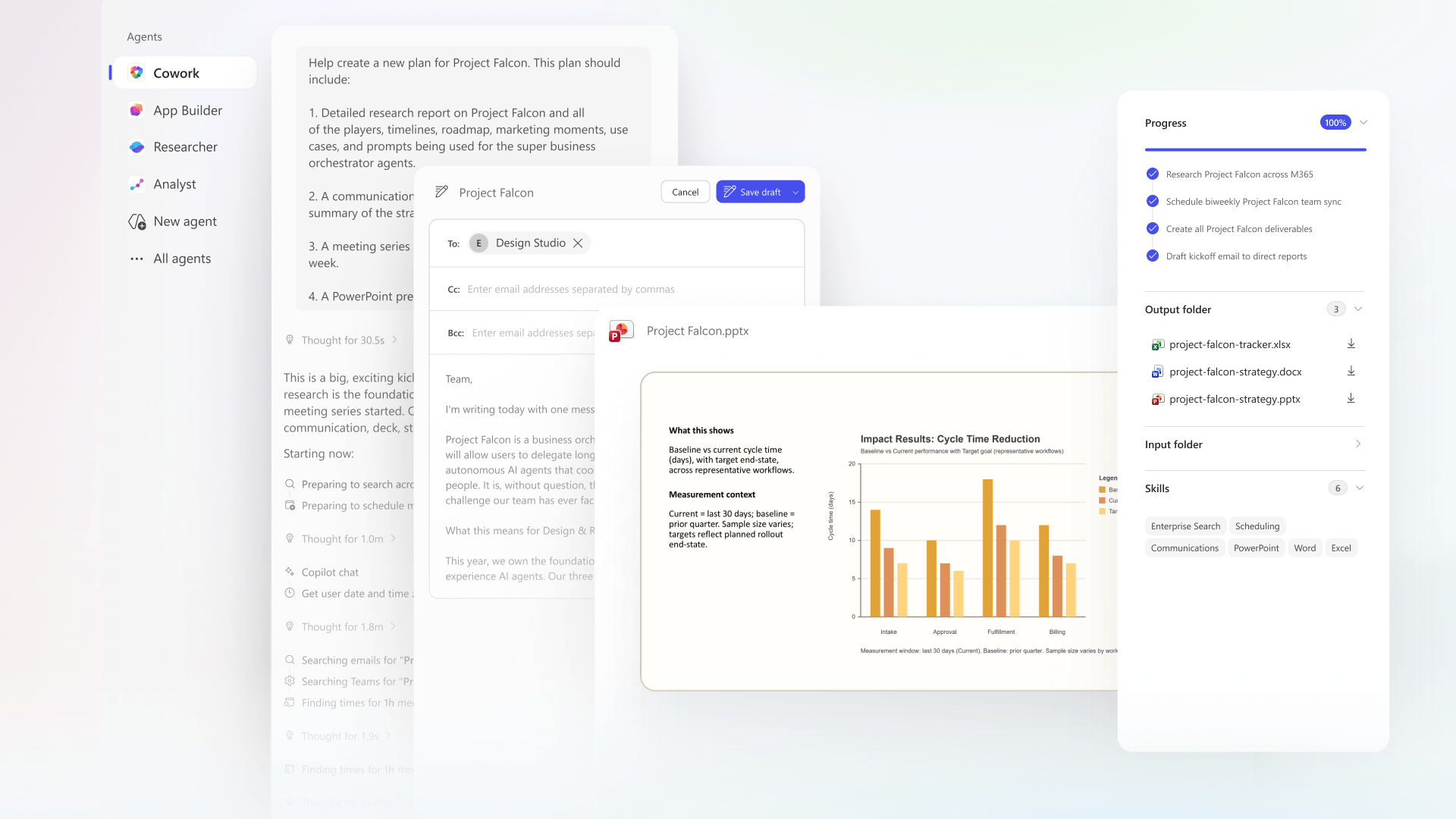
What is Microsoft Cowork?
Cowork is an outcome-driven AI tool that actually does the work for you and focuses on output, rather than just answering questions. Where a traditional Copilot chat is fast and conversational, Cowork behaves more like a colleague you delegate to: you brief it on what you want, it goes away and processes the task in the background, and you come back to a finished draft ready to review and refine. Better still, you can fire off several tasks at once and have them all progressing in parallel.
The first thing I realised: you need a use case
When I first got my hands on Cowork, I was buzzing to dive in. Like most people glued to Microsoft’s AI journey, I’d watched the announcements and demos and couldn’t wait to play. But within minutes, something caught me off guard, Cowork isn’t your usual Copilot experience. With most AI tools, you can just open them up, pop a few random questions in, poke at some prompts and see what sticks. With Cowork, my very first realisation was: “Oh… now I actually need a use case.”
That was my first big lightbulb moment. Cowork is built around outcomes. It thrives when you know what you want it to produce, not when you’re idly experimenting to see what comes back. It feels less like searching, and a whole lot more like delegating.
The moment it clicked
The first real job I threw at it was deduplicating and cleaning up data from our CRM. The kind of task I could do myself — but only if I fancied losing a few hours to it. So instead, I handed Cowork the data, explained exactly what I wanted, and let it crack on.
That was the moment it stopped being a clever demo and became genuinely, properly useful. And once that clicked, I started reaching for it constantly.
What I’ve actually used Cowork for
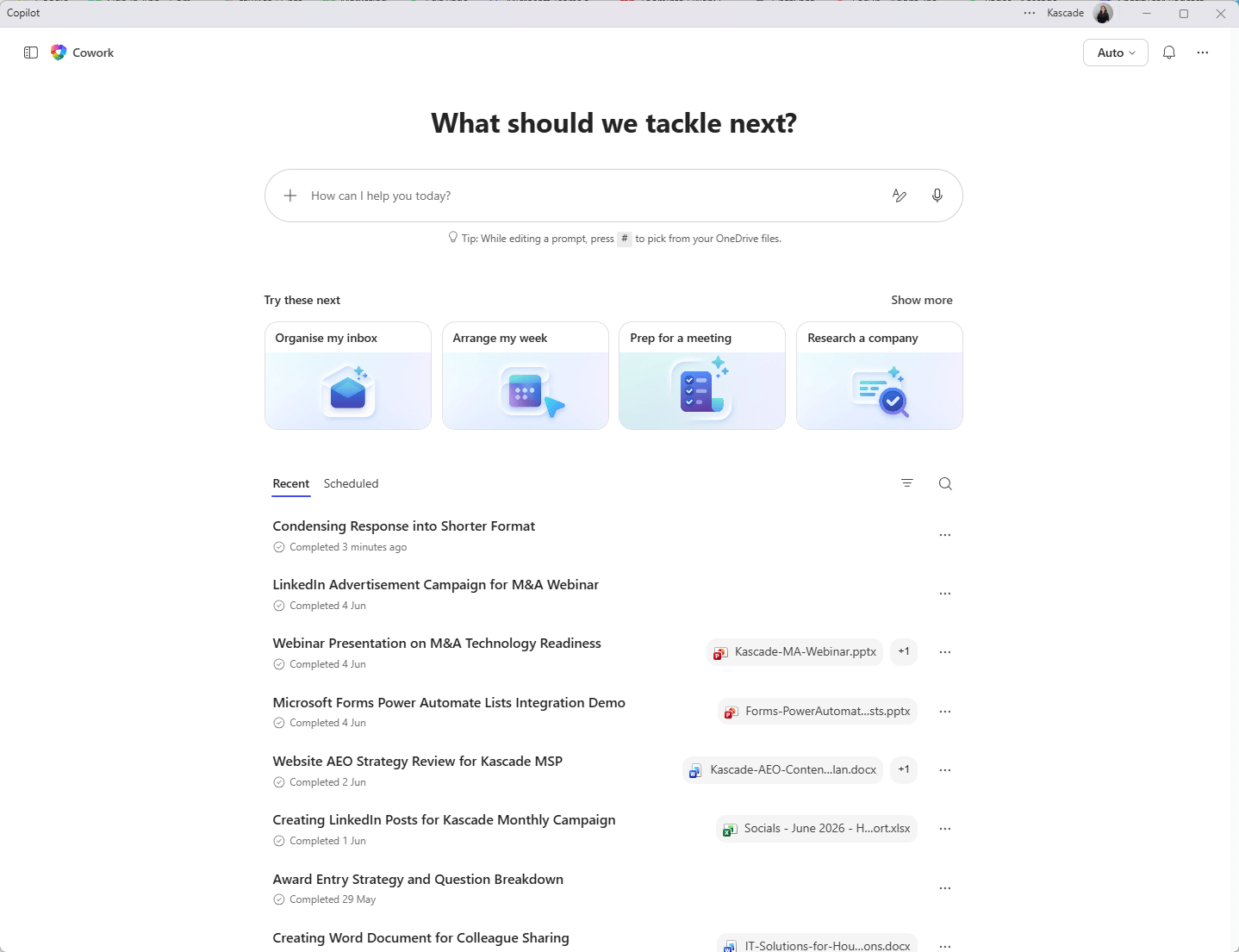
This, for me, is where Cowork really pulls ahead. Over the past month I’ve used it to create:
- Webinar content — structured, on-message and ready to build from, not generic filler.
- Imagery — visuals to bring content and campaigns to life.
- Documentation — clear, properly formatted and genuinely usable.
- Analysis — turning messy data (like that CRM job) into something clean and actually insightful.
- Guides — step-by-step, in-depth and ready to share.
But here’s the crucial part: these aren’t the quick, lightweight responses you’d get from the usual Copilot experience. They’re in-depth, often branded, fully-formed deliverables, and frequently I’m getting multiple outputs from a single prompt. One well-structured brief can come back with a piece of content, the supporting imagery and the documentation to go with it, all in one go.
That’s what takes it to a whole new level. You’re not nudging an assistant for a paragraph here and a bullet list there — you’re commissioning a complete piece of work and getting a set of polished, joined-up assets back. Once you’ve seen that, it’s hard to go back.
Cowork fits into your day differently
Here’s something I noticed almost straight away: Cowork doesn’t play by the instant-response rules we’ve all got used to. Copilot chats are quick and snappy. Cowork takes a little longer, because it’s genuinely building and processing the work behind the scenes. And the surprise? I didn’t find that annoying in the slightest. If anything, I love it.
I’ve lost count of the times I’ve set Cowork going as I jump into a meeting, at the end of the day, or as I head off for lunch and when I come back I find the work sitting there, finished and waiting. I’ve kicked off a task on my way out to lunch and come back to a polished draft ready for review.
But here’s the bit that really won me over: you’re not stuck doing one thing at a time. You can have multiple Coworks running in parallel, one drafting webinar content, another scrubbing your CRM data, a third pulling documentation together all at once! Instead of plodding through tasks one by one, you’re briefing a whole team at the same time and collecting the results as each one lands.
And as someone who works in a solo team, it’s like having a little team quietly pushing your to-do list forward while you get on with everything else. The best way I can put it? Cowork feels like having a brilliant junior colleague in your corner. It’s not here to replace people, and it’s not magically perfect, but it produces real, meaningful output you can review, refine and run with. This, for me, is where AI is really starting to show instant value and great outcomes!
Copilot helps you get answers faster. Cowork helps you get outcomes. For busy teams, that’s not a small difference, it’s a game-changer.
Prompting matters more than ever
If there’s one lesson that’s hit home this past month, it’s how much prompting matters with Cowork. Yes, good prompts count with every AI tool, but here, the gap between a lazy one-liner and a properly structured brief is night and day.
You simply can’t toss in a vague instruction and expect brilliance back. The thing that transformed my results was the GCSE framework.
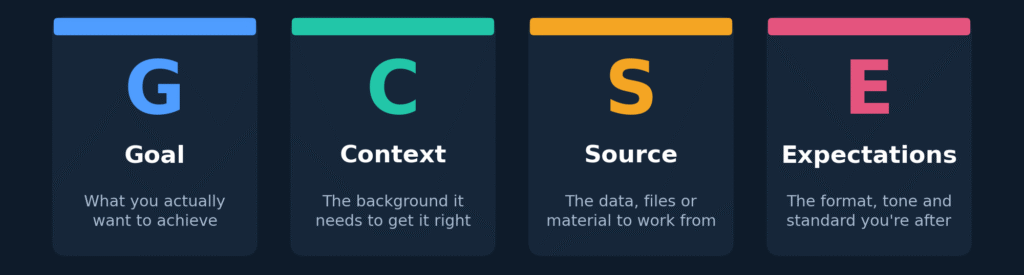
And don’t be shy about length, short prompts are not your friend here. The more detail and specifics you give Cowork, the better the output gets. Every time. It genuinely rewires how you think about AI. You stop treating it like a search engine, and start treating it like briefing a colleague to take a real task off your plate.
This feels like where AI is heading
A month in, I’m convinced: Cowork is a glimpse of how organisations are going to start using AI.
For anyone who’s permanently busy and trying to work smarter, the ability to hand over structured tasks and get meaningful work back is seriously powerful. That said, this isn’t something you can just switch on and walk away from. People still need clarity on outcomes, solid prompting habits, and proper governance around how AI is being used.
But the direction of travel? Not just AI assistants that answer questions, but AI coworkers, agents and systems that actively help us create content, organise information and get real work done, ready for us to review and approve.
So in summary, after a month with Co-work, I can honestly say I am loving it and can’t wait to see what is next!
Want to understand how Cowork can help you?
If reading this has got you thinking about where Copilot and Cowork could fit into your organisation, I’d genuinely love to chat. Whether you’re just getting started, weighing up use cases, or working out how to roll it out the right way, let’s talk it through and explore what’s possible for your team.

Frequently Asked Questions
- How is Cowork different from Microsoft Copilot? Copilot is fast and conversational — perfect for quick answers and in-the-moment help. Cowork is outcome-driven and asynchronous: you brief it on a task, it works away in the background, and you come back to a finished draft to review. Copilot helps you get answers quicker; Cowork helps you achieve outcomes — often in-depth, branded deliverables rather than quick replies.
- What can you actually create with Cowork? Plenty. So far I’ve used it for webinar content, imagery, documentation, data analysis and step-by-step guides. The difference is the depth — these are full, often branded deliverables, and a single well-structured prompt can return several joined-up outputs at once.
- How do I get Cowork? Cowork has to be enabled and assigned at an organisation level, it’s not something individuals can simply switch on themselves, so the first step is a conversation with your IT or admin team. It also needs to be a considered business decision, because the data is processed in the US, meaning data residency and your internal compliance policies should be part of that call. Get those foundations right, and you can roll it out deliberately with the proper guardrails in place from day one.
- Can you run multiple Cowork tasks at the same time? Yes — and it’s one of the best bits. You’re not limited to one job at a time. You can have several Coworks running in parallel, each tackling something different, and review each one as it completes. It’s a bit like delegating to several colleagues at once instead of working through everything in a queue.
- Can Cowork action things for me, like emails? Yes. Cowork isn’t just for producing documents — it can take action across your Microsoft 365 tools, including drafting and sending emails, pulling together calendar invites and working with your files. As always, you stay in control: you can review what it’s produced before anything goes out.
- Where do I find my finished output? Your completed work is saved into your Cowork folder in OneDrive (typically under Documents/Cowork), so it’s easy to find, share and pick back up later. Anything Cowork creates as a deliverable lands there ready for you to review.


Leave a Reply